.jpg)
B59E289954044BDEB4F93EC7F6B76F99.jpg)







Description
-
BrandEATON
-
ModelXVS-440-10MP1-1-1U
-
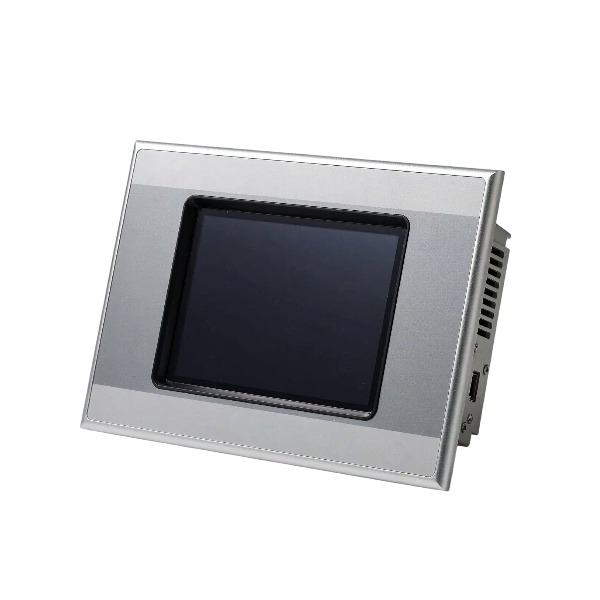
Product NameXVS400 10.4" Infrared Touch HMI Panel
-
Place of OriginGermany
-
Customs HS Code85285211
-
Power Supply24 Vdc (20.4–28.8 Vdc)
-
Dimensions275 mm × 210 mm × 56 mm
-
Weight1.9 kg
-
Operating Temperature12 month
-
Storage Temperaturebrand new
-
Warranty
-
Product Status
Diagnostic Methods for EATON XVS-440-10MP1-1-1U
The Eaton XVS-440-10MP1-1-1U belongs to the XVS400 series, a 10.4-inch touchscreen HMI with integrated PLC capability.
Begin troubleshooting by checking the green SUPPLY OK LED. If this indicator is off, examine the 24 VDC supply voltage, wiring polarity, fuses and terminal connections.
Evaluate status LEDs including PROFIBUS ACT, TOUCH ACT and TOUCH ERROR for initial fault screening.
Enter the onboard self-diagnostic menu within the Windows CE operating system to review system logs, alarm history and runtime error information.
For boot failures or system lockups, inspect the CompactFlash card for poor contact, corrupted files or missing runtime software; reseat the card or reload the CF card program as needed.
When touch operation fails, clean the infrared touch frame, execute touch calibration, and observe steady flashing of the touch fault indicator.
For communication issues over PROFIBUS, MPI or Ethernet, confirm the station address, baud rate, terminating resistor, cable condition, and firmware compatibility between the HMI and PLC.
Connect with Eaton engineering software via Ethernet or serial interface to retrieve diagnostic logs, back up the application project and enable online monitoring.
For intermittent faults, assess ambient conditions such as cabinet temperature, humidity, dust accumulation and vibration.
Verify internal PLC input and output channels by monitoring live I/O status on the HMI display.
Document fault codes and timestamps; reload the HMI application project in the event of software anomalies.
Perform a power cycle reset first for non-permanent hardware faults. If the malfunction remains unresolved after these checks, replace the unit for confirmation.

Fully power down the HMI before extracting the CompactFlash card to prevent data corruption and hardware harm.
Carefully remove the CF card and examine its gold contact pins for oxidation, dust, scratches or bent pins. If contaminated, gently wipe the contacts using a dry anti-static cloth.
Reinsert the CF card securely into the slot and reboot the device to check if it can be recognized properly.
Verify card compatibility. This HMI demands an industrial CompactFlash card of suitable capacity; commercial high-speed CF cards are likely to be unrecognizable.
Insert the CF card into a PC with a CF reader to check detection status. Back up the existing project and system files right away if the card is accessible.
Format the CF card to the FAT16 file system, which is mandatory for the XVS400 series; other file systems will not work correctly.
Once formatting completes, restore the HMI runtime image and user application project through Eaton programming software.
If the card remains undetected or continues throwing read/write errors after file restoration, substitute it with a certified industrial CompactFlash card.
After replacement, download the verified project, configure boot parameters, and perform a complete startup and communication test.
Never hot-swap the CompactFlash card while the unit is powered on, as this may result in file corruption and irreversible card damage.
FAQ: Eaton XVS-440-10MP1-1-1U HMI Touch Panel
Q: What is Eaton XVS-440-10MP1-1-1U?
A: Eaton XVS-440-10MP1-1-1U is a 10-inch XVS series industrial HMI touchscreen, used for machine visualization, parameter setup, status monitoring and data exchange with PLCs.
Q: What is the screen specification of XVS-440-10MP1-1-1U?
A: It features a 10-inch TFT color touch display with high brightness, resistive touch interface, clear viewing for workshop control cabinet installation.
Q: What communication ports are available on Eaton XVS-440-10MP1-1-1U?
A: Equipped with Ethernet port, RS232 and RS485 serial ports, supporting multiple industrial communication protocols to connect with PLC, inverter and controller.
Q: Which protocols does XVS-440-10MP1-1-1U support?
A: It supports Modbus RTU, Modbus TCP, Eaton SmartWire-DT, Siemens S7, Allen‑Bradley and other mainstream PLC communication protocols.
Q: What software is used to program Eaton XVS-440-10MP1-1-1U?
A: Eaton Galileo software is used for screen project design, graphic configuration, logic editing, offline simulation and program download.
Q: What is the power supply requirement for XVS-440-10MP1-1-1U?
A: Rated power supply is 24 VDC, standard industrial control power input.
Q: What is the operating temperature range of Eaton XVS-440-10MP1-1-1U?
A: Operating temperature range: 0°C to 50°C, suitable for indoor control cabinet industrial environments.

XVC-676-GTI10-DPM-V1
XV-102-B6-35TQR-1AL
SL72S4SH3LANL7MNR25
XV-303-15-C00-A00-1C
XV-152-D6-84TVRC-10